Mission mode
The Mission interface is based on datalink messages that dynamically add tasks (basic navigation patterns) to a queue, rather than using a static sequence like the flight plan.
Loading the mission controller
The mission controller is based on a module, that holds a common part for the message parsing and a specific part for the navigation (which depend on the firmware). Currently the available modules are:
conf/modules/mission_fw.xmlconf/modules/mission_rotorcraft.xml
The interface provides a mission_run() function that must be called from the classic flight plan.
The mission controller will gives the control back to the flight plan when there is no more tasks to do.
A sample flight plan is provided with takeoff, mission control and landing procedures: conf/flight_plans/mission_fw.xml.
Mission elements
The elements (or tasks) are basic navigation patterns that are sent to the aircraft and stored in a circular buffer. For each element, an insertion mode and an index is required. A duration can be defined as well. The index (1 byte) for each element is left to the user. The report message will send back the array of index.
Note
The index must be uniq in the circular buffer. If an element is sent with an index already existing in the list, it will be ignored.
The index valid range is [1 ; 255]. Index 0 is reserved to signal there are no mission elements left.
The insertion modes are:
Append: add the task at the last position of the tasks list.
Prepend: add the task before the current element (the current one remains in the list).
ReplaceCurrent: replace the current mission element.
ReplaceAll: remove all elements in the tasks list and add a new one.
A duration for each element can be specified. The time is a floating point value in seconds.
When setting a zero or negative value, the duration parameter is not taken into account.
Be aware that some navigation patterns (like segment) will end when reaching the end of the pattern or at
the end of the duration time, but some (like circle) will not end if a positive duration is not set.
It is always possible to go to the next mission element with the NEXT_MISSION message.
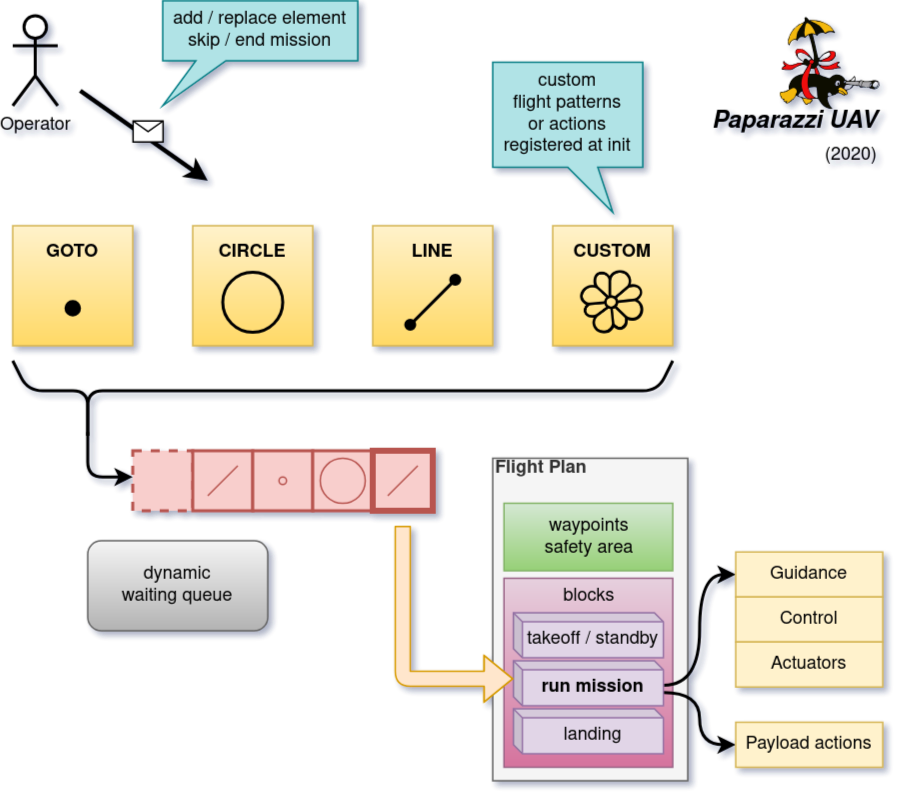
Mission status report
The mission controller is periodically sending a report message MISSION_STATUS with the following fields:
remaining_time : time remaining for the current element in seconds (-1. if unlimited time)
index_list: list of the elements pending in the mission controller
each value in this list correspond to the index of each element
the first element in the list is the current one
if the list is empty, a single element with the value zero (0) is sent